3DEXPERIENCE SOLIDWORKS
What’s New in SOLIDWORKS 2026x FD01 – Collaboration and Data Management


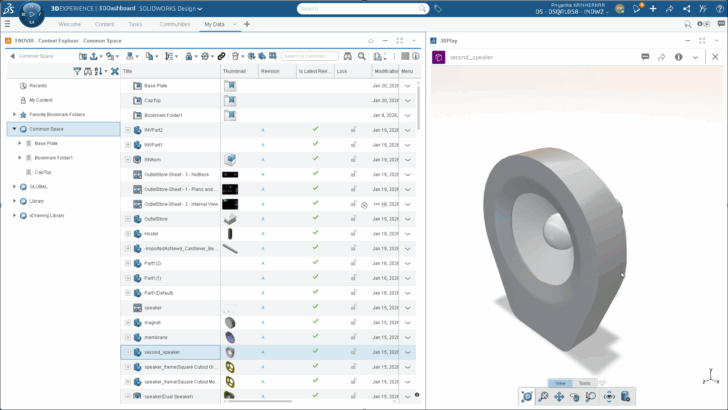
Top enhancements include the new Content Explorer app, enhanced admin settings when adding bookmarks, material definition on the 3DEXPERIENCE platform and more.
... ContinuedDeadline for Top Ten List Idea Submissions is Approaching – Voting Begins January 2nd

It’s that time of year again when you can help make SOLIDWORKS better by voting on the Top Ten List of ideas that have already been submitted, but hurry. The deadline for voting is Friday, December 19th, so be sure your vote counts by voting today!
... ContinuedBridging the Gap between Design and Manufacturing: A Collaborative Approach
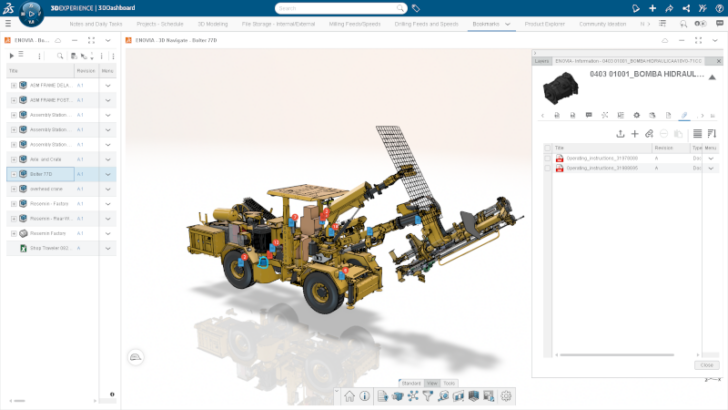
Designers play a critical role in bridging the gap between design and production, ensuring that products are not only functional but also optimized for manufacturing.
... ContinuedSkip the Blank Sheet: Discover the Generative Drawing Experience in SOLIDWORKS
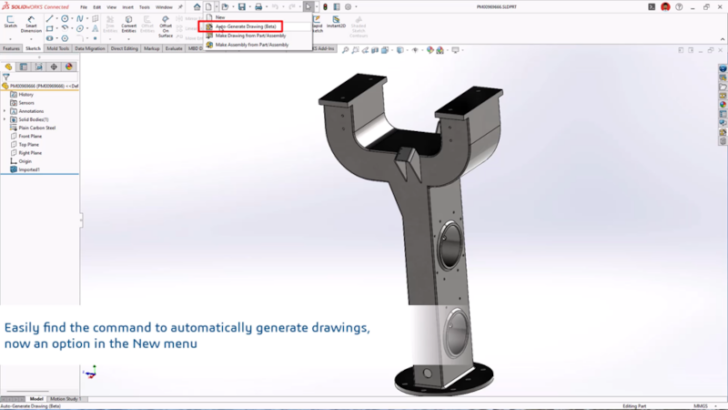
In this workflow you simply open a model, hit Auto Generate Drawing (Beta) under the New menu to generate a drawing sheet with views and proposed dimensions.
... ContinuedWhat’s New in SOLIDWORKS R2025x FD03 – Collaboration and Data Management

This update brings exciting new features, including selective loading of assemblies with advanced filtering, along with improvements to drawing stamping, task scheduling, and more!
... ContinuedWhat’s New in SOLIDWORKS R2025x FD03 – Design and Modeling

This update has some huge productivity gains, including selective opening of assembly components, automatic fastener recognition and assembly, improvements for automatic drawing creation, and much more.
... ContinuedSetting Up and Managing SOLIDWORKS Libraries on the 3DEXPERIENCE Platform

In this post, I’ll guide you through the process of storing and linking SOLIDWORKS libraries to the platform and then walk you through how administrators can deploy the configuration organization wide.
... ContinuedWhat’s New in SOLIDWORKS ECAD-MCAD Collaboration

The update includes CircuitWorks support for parent-child associations, the ability to undo MCAD changes in CircuitWorks, and a collaboration recovery feature if your system unexpectedly restarts.
... ContinuedWhat’s New in SOLIDWORKS R2025x FD02 – Design and Modeling

This update enables you to start a design session in Offline Mode if you lose internet connectivity, the ability to add your own keywords to the Command Search and more.
... ContinuedWhat’s New in SOLIDWORKS R2025x FD01 – Collaboration and Data Management

Enhancements include access to the SOLIDWORKS User Forum right from your design environment, support for SOLIDWORKS cut lists, the ability to more easily track changes and much more.
... ContinuedWhat’s New in SOLIDWORKS R2025x FD01 – Design and Modeling

This update includes the ability to automatically generate industry-standard drawings from your 3D models, a new Simplified Interface option so you can stay focused on your models and much more.
... ContinuedDino-Might: The Masterminds Behind It All

Back in October, Adrian Diaz swooped around the spooky streets of Salem, MA, with his transforming pterodactyl costume. Let’s go behind the scenes and learn about the dedicated team that made his costume a reality.
... ContinuedDiscover New Design Methods and Solutions at 3DEXPERIENCE World 2025

Learn about the latest cloud-connected solutions, including SOLIDWORKS Ultimate, Electrical Schematic Designer, and get a sneak peak of a new electrical solution in these sessions from the product management team.
... ContinuedMy Top Five Platform Features Delivered in 2024 in SOLIDWORKS

With so many enhancements delivered each year, and many inspired by our users, it was hard to pick just five, but here’s a handful of my top five delivered in 2024.
... ContinuedMusic is Magic: Creating a Custom Chair

The SOLIDWORKS Magic Wheelchair build team is back at it again, designing and building the most epic and most complex Magic Wheelchair yet.
... Continued