Search Results for art
Educators and Students – Check Out SOLIDWORKS Live and Be Part of 3DEXPERIENCE World 2026



If you teach, use or love SOLIDWORKS and want to know the latest and greatest technology, along with some really cool people and products, check out a list of events from my friends, Sean O’Neill. and Jesse Sprague, Sean and
... ContinuedLesson 7: SOLIDWORKS Academic Certification – CSWA Exam Part 2
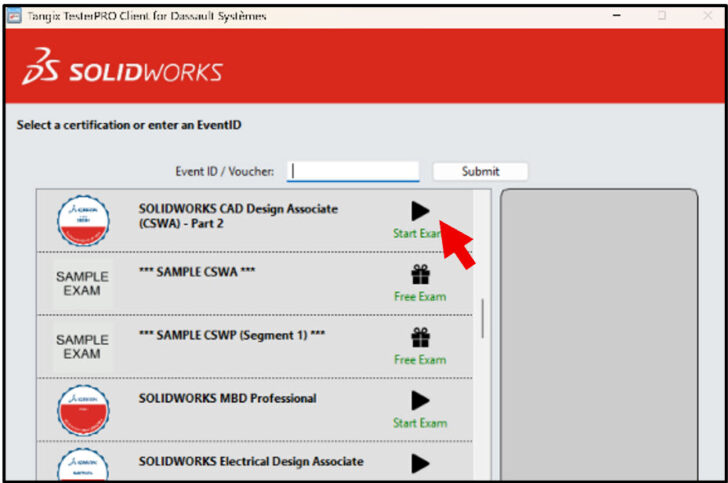
In Lesson 6, we covered general information, content and taking the on-line proctored Part 1 of the SOLIDWORKS CAD Design Associate (CSWA) Certification exam. The exam can be taken with either Desktop SOLIDWORKS or 3DEXPERIENCE SOLIDWORKS. Note: You need to
... ContinuedLesson 6: SOLIDWORKS Academic Certification – CSWA Exam Part 1
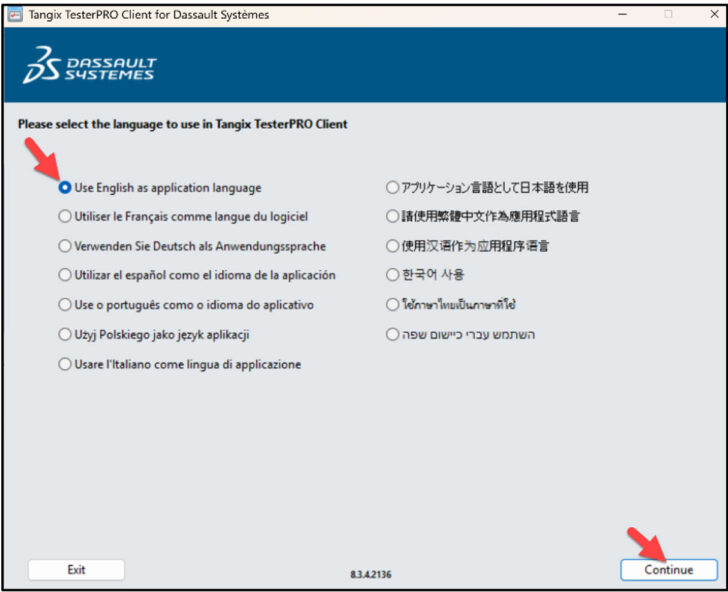
In Lesson 5, we covered accommodating student’s needs. The first section addressed student password recovery. The second section addressed an Academic Provider obtaining extra exam time for a student. Lesson 6 covers general information, content and taking the on-line proctored
... ContinuedFIRST Robotics Kit of Parts for SOLIDWORKS 3D CAD and Cloud Apps

SOLIDWORKS is proud to sponsor FIRST teams with SOLIDWORKS software. You can use SOLIDWORKS 3D CAD software on your Windows – based PC or SOLIDWORKS Cloud Apps 100% in your web browser on your MAC, PC, Tablet, Chromebook or Mobile
... ContinuedCFD Lesson 5: SOLIDWORKS Duct and 3DEXPERIENCE Fluid Scenario Creation (Part 2)

From the SOLIDWORKS Task pane, launch the Fluid Scenario Creation App to open the Duct created in the previous lesson . Display a cross-section of the mesh and explore the Mesh Visualization options. Create two mass flow sensors to prove a successful converged study. Add streamlines with a new material, Nitrogen and plot Gauge Pressure and Velocity. After a successful simulation, return to SOLIDWORKS.
... ContinuedCFD Lesson 4: SOLIDWORKS Duct and 3DEXPERIENCE Fluid Scenario Creation (Part 1)

Start with the SOLIDWORKS Duct part and save to cloud storage using Bookmarks in a collaborative space on the 3DEXPERIENCE Platform. Launch the Fluid Scenario Creation App from the SOLIDWORKS Task Pane. Create a Finite Element Model (FEM) and use the Assistant dialog box and Action toolbar to develop a internal flow simulation that models mechanical forces and dynamics of steady state fluid flow. Define the fluid and internal regions. Customize the Hex-dominant mesh. Apply boundary conditions and determine the pressure, flow velocity and mass flow results with the Physics Results Explorer App.
... ContinuedCFD Lesson 3: SOLIDWORKS and 3DEXPERIENCE Fluid Scenario Creation (Part 3)

In this lesson, start a SOLIDWORKS session and open the SOLIDWORKS part, Ball valve. View the current Status State, Revision and Maturity State in the SOLIDWORKS Task Pane. Make a design change and re-run the simulation with Fluid Scenario Creation App and view the new results. See how the 3DEXPERIENCE platform keeps track of revisions and manages information from SOLIDWORKS models on your PC to cloud storage running in a web-browser.
... ContinuedCFD Lesson 2: SOLIDWORKS and 3DEXPERIENCE Fluid Scenario Creation (Part 2)

Continue exploring internal flow analysis with the Ball valve assembly as your use the 3DEXPERIENCE Platform apps Fluid Scenario Creation and Physics Results Explorer. View contour plots and streamlines to illustrate flow through the Ball valve,
... ContinuedCFD Lesson 1: SOLIDWORKS and 3DEXPERIENCE Fluid Scenario Creation (Part 1)

In this lesson, learn the proper workflow to upload a SOLIDWORKS assembly to the 3DEXPERIENCE platform. Create and perform a simple internal flow simulation on a ball valve using the Fluid Scenario Creation App. The Fluid Scenario Creation App provides the ability to perform an analysis of both internal and external flows.
... ContinuedAnalysis Lesson 3: SOLIDWORKS and 3DEXPERIENCE Simulation Linear Structural Validation Part 2

In the previous lesson, we created a linear structural simulation study using SOLIDWORKS and 3DEXPERIENCE Simulation technology. Now modify the study and create new Simulation contour plots. Review the plots to interpret the results for Von Mises Stress, Factor of Safety, Reaction Force and Displacement.
... ContinuedAnalysis Lesson 2: SOLIDWORKS and 3DEXPERIENCE Simulation Linear Structural Validation Part1

Why do I teach my first year engineering students about simple stress analysis using 3DEXPERIENCE Simulation? I want them to get excited about their more advanced classes over the next 4 years. Learning the theory to derive complex formulas to understand the variables is essential, but getting early exposure to simulation software, brings theory to reality with instant visualizations and what-ifs. This shows the students the potential of using simulation in the real world. In this lesson, learn the proper workflow to upload a SOLIDWORKS part to the 3DEXPERIENCE platform and perform a Static Linear Simulation study using the Abaqus solver.
... Continued3DEXPERIENCE Works Lesson #1: Getting Started with SOLIDWORKS and the Platform

What is the 3DEXPERIENCE platform? Why should I use the platform? How does it work within my SOLIDWORKS session? To find out the answer to these questions, review Getting Started with SOLIDWORKS and the Platform.
... ContinuedJason Pohl’s Newest Partner Creates a Rocket Ship with SOLIDWORKS Apps for Kids

Industrial designer, Jason Pohl and his new partner, son, Maxton – 8 years old, gets a chance to sit in dad’s chair and explore SOLIDWORKS Apps for Kids. SOLIDWORKS Apps for Kids is a collection of web-based apps that are
... ContinuedGetting Started in 3D Design with SOLIDWORKS, 3DEXPERIENCE Platform through Trace Academia Mobile App

To get started, download the Trace Academia App on your mobile and search SOLIDWORKS. Can we democratize technology to everyone by providing education and hands-on learning through mobile apps? Can we teach concepts of 3D Design, the 3DEXPERIENCE platform, and
... ContinuedSOLIDWORKS xDesign Lesson #1: Getting Started

After teaching 1000’s of students and writing about SOLIDWORKS for over 25 years, David Planchard, emeritus WPI, is exploring xDesign. Through the SOLIDWORKS xDesign Lesson series, David helps educators understand the differences and similarities between xDesign and
... Continued