
Mechanical engineers do not wake up thinking about artificial intelligence (AI). They wake up thinking about deadlines, drawings, and tolerances; that one mate that broke again…and whether today will be the day the design finally feels done.
There’s been a lot of hype over AI in the last few years, but lately something has shifted, and it’s a good time to pay attention. AI has stopped being a demo on a keynote slide and started showing up where real work happens—inside sketches, assemblies, and drawings.
The Real Evolution: from Decisive AI to Assistive AI
Mechanical engineers have seen technology waves come and go. Expert systems, automation, and parametric modeling. Generative tools that looked amazing in demos and struggled in the wild, once the messy reality of constraints showed up.
So, when AI started appearing everywhere, skepticism was reasonable, but something important has changed. AI is not a replacement for engineering judgment. It is designed to assist.
AI is no longer trying to replace thinking. It is learning how to support it.
Early AI tried to be decisive by generating a design, optimizing a shape, and replacing manual effort entirely. That approach struggled in mechanical engineering for a simple reason—engineering is contextual. Constraints change. Intent shifts. Trade-offs matter. Manufacturing has opinions. Cost and physics also play a role.
The newer wave of AI focuses somewhere else—on setup, cleanup, recall, and reducing the mental load between decisions.
Instead of asking, “What should the design be?” it asks, “What can I remove so the engineer can think clearly?”
This is the version of AI that is well-suited for mechanical engineering, and it is already integrated into SOLIDWORKS.
Staying in Motion Instead of Searching
A surprising amount of engineering time is not spent designing. It is spent searching. Searching through menus and the help section, and trying to remember the command that you know exists but cannot recall.
This is where SOLIDWORKS has already been evolving. Tools like the Command Predictor predict your next move based on what you are doing, so the path forward stays visible, giving you options of what to do next. You keep moving. You stay in flow.
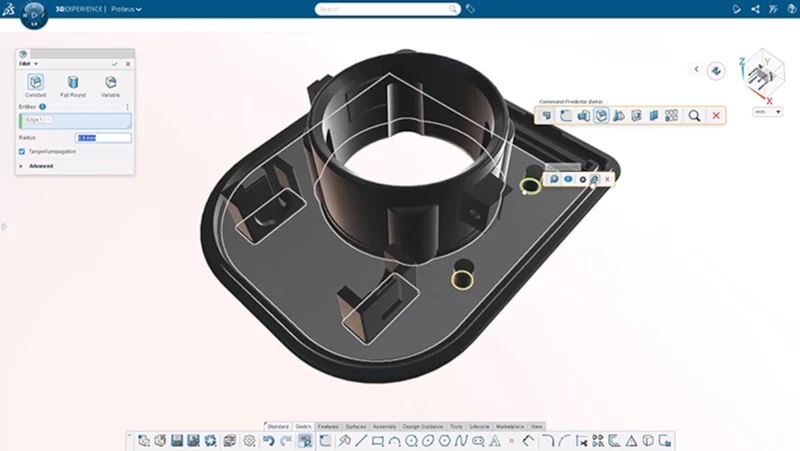
That might sound small. It is not. Momentum is fragile. Once it breaks, errors creep in. You start second-guessing. You start redoing work you already did. You lose time, then you lose confidence, then the whole thing feels heavier than it should.
Assistive intelligence helps you stay in motion, not by making decisions for you, but by keeping friction from piling up.
Cleaning Up What Used to Steal Your Afternoon
Every engineer can relate to this. You change one thing, and something else breaks. A sketch relation dangles after a design change. An imported shape needs to be simplified before you can use it downstream. You need to select dozens of similar faces or edges and keep missing one. Face selection turns into a test of patience.
This is not creative work. But it is unavoidable work.
SOLIDWORKS already supports you here with tools that reduce rework and reduce guesswork:
- Repair Sketch Relations restores broken constraints while preserving intent.
- Repair Missing Mate References rebuilds mates instead of forcing a redo.
- Selection accelerators help you select patterns faster instead of hunting one face at a time.
- Defeature Silhouette helps create simplified representations while keeping a parametric link.
None of these tools shout for attention. They do something more valuable. They give time back. And that time goes exactly where it should go, into real engineering decisions.
One-click Help For Part Errors
Rebuild failures happen. Sometimes the cause is obvious. Often it is not. The What’s Wrong dialog in SOLIDWORKS is helpful as it shows you what might have failed. To make it smarter, it is getting its own virtual companion that will tell you the most likely cause of a part failure, so you can fix it faster without having to go through all possible failures in the dialog. It will tell you the root cause. You still decide how to resolve it. You still own the intent. You just spend less time guessing.
The Next Wave Inside SOLIDWORKS: Skills, Not Just Commands
Here is where the story gets more interesting.
The first phase of AI in CAD shows up as helpers inside existing workflows. Faster selection. Faster repair. Faster first drafts.
The next phase feels different. AI gets more skilled. It’s not just a command, but a capability that enables you to ask for help with an outcome.
You stay focused on the job. The software handles the setup, the interpretation, and the first pass.
That is the direction AI is going in SOLIDWORKS.
Ask AURA
Engineering is built on documents. Specs. Standards. Supplier datasheets. Test reports. Compliance requirements. Email chains that somehow became official.
Most of it is dense. Some of it is painfully long.
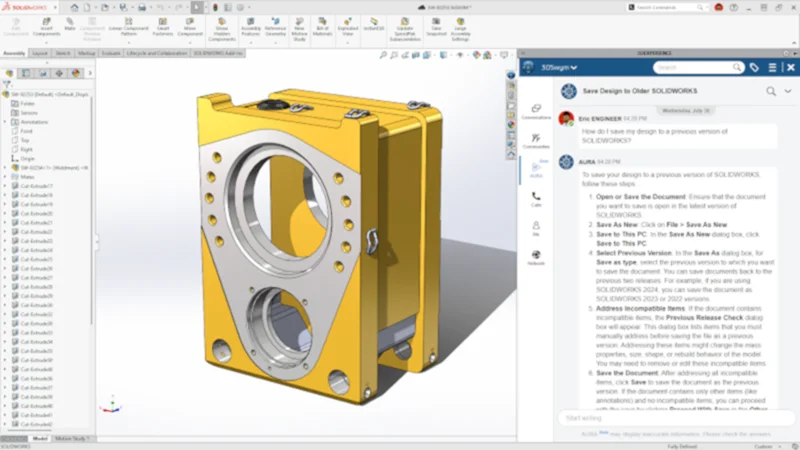
With AURA, a new virtual companion in SOLIDWORKS Design on the 3DEXPERIENCE platform and 3DSwym you can quickly search documentation internal and public-facing content to summarize posts, questions, and wikis to capture key takeaways at a glance.
Not because reading is hard, but because your time is valuable. And scrolling through fifty pages to find one tolerance callout is not what you were hired for.
Contextual Help Instead of Static Answers
AI’s evolution is not only about geometry. It is also about knowledge.
Engineers do not need more documentation. They need the right information at the right moment.
That is the direction behind AURA as a virtual companion that provides grounded assistance tied to what you are working on, and surfaced in the places engineers already live, like CAD sessions and engineering communities.
Here too, the lesson is the same. The value is not novelty. The value is less interruption, less searching, and less context switching; freeing up time to focus on the decisions that actually matter.
This Is Only the Beginning
If you take one thing away from this, let it be this. AI in mechanical engineering is not a future feature. It is a workflow shift.
It starts with small helpers. The ones you barely notice until you realize you got an hour back. Then AI gets smarter by providing answers, so you don’t have to remember commands.
Then it becomes more intent-driven design, where the software understands what you mean earlier in the process and helps you get to a good first draft faster.
And the gap between idea and real geometry keeps shrinking.
That is why this should be an eye-opener. Not because AI is flashy. Because it is practical.
It removes the repetitive work, the setup, and it gives you back what engineers always want more of.
Time to think.
Time to decide.
Time to engineer.
Learn more at 3DEXPERIENCE World, where AI will be a hot topic. Catch my presentations:
Designing in the Age of AI: From Ideation to Final Design – co-hosted by Milos Zupanski
Monday, Feb 2nd from 2:30 PM – 3:15 PM CST
SOLIDWORKS Virtual AI Companion in Action: AURA – co-hosted by Milos Zupanski
Monday, Feb. 2nd from 4:15 PM – 5:00 PM CST
See my last blog on drawing automation here. And stay tuned for more AI and automation updates in SOLIDWORKS coming soon. The R2026x FD01 functional delivery update drops February 7th!
Learn more about AI in SOLIDWORKS here.