

This year marks 30 years of SOLIDWORKS, and we are excited to announce the latest release of SOLIDWORKS 2026 coming this November. We sat down with Manish Kumar to learn more about what’s new in 3D design and collaboration, and what’s coming. The enhancements discussed below apply to SOLIDWORKS Design.

1) WHAT ARE YOUR FAVORITE ENHANCEMENTS FOR SOLIDWORKS 2026?
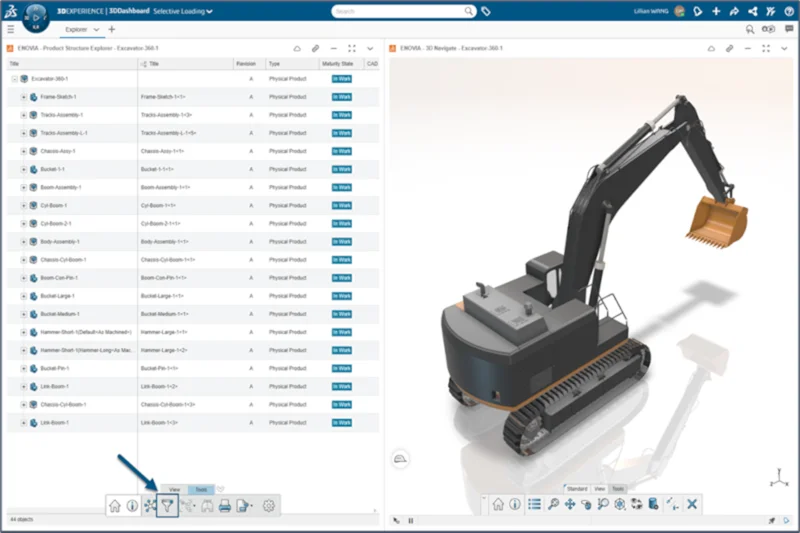
Earlier this year, in the July release, we added the capability to selectively open portions of your design structure from the 3DEXPERIENCE platform. This enables you to visualize component relationships and use advanced filtering to find relevant components. After saving a Filter, you can open it in SOLIDWORKS.
This also enables multiple users to work collaboratively on the same large assembly, which is particularly helpful, as multiple designers can work efficiently on the same large assembly without interfering.
For example, without selective loading, if a design team is working on an excavator, and one person is working on the hydraulics and another on the engine or interior cabin design, you’d have to load the entire excavator. This is time-consuming, and when it’s loaded, it can use up many resources on your system. With selective loading, you can create a filter and define what to load. Everyone who is working on the excavator can see all changes happening in real-time. This is a huge performance improvement, as you can define the context using filters that apply to the sections you want to see.
- AI Enhancements
Generative Drawing
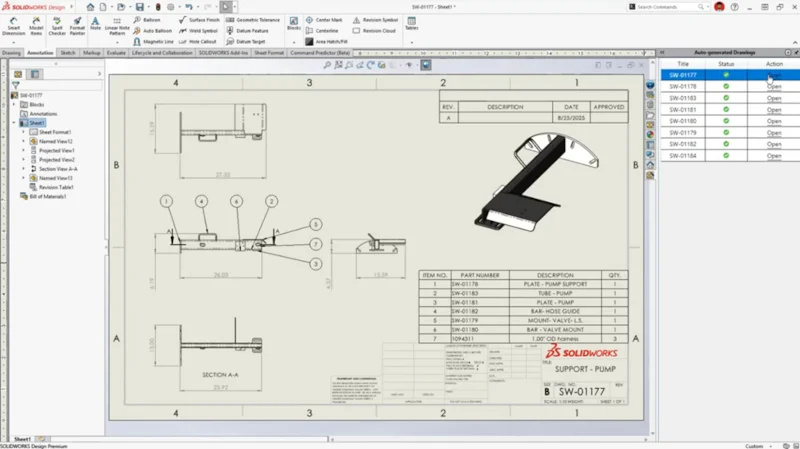
Generative drawing is one of the hottest enhancements powered by artificial intelligence (AI) and is going to dramatically speed up drawing creation. The Auto-Generate Drawing (Beta) tool quickly produces a drawing sheet with suggested views and dimensions. Once this command is enabled, views are automatically arranged using AI to avoid overlap with each other and with annotations.
Intelligent Hole Callout Creation
The Hole Wizard recognizes native SOLIDWORKS or imported geometry that looks like holes, such as countersunk, counterbore, and through holes, and intelligently applies the appropriate hole callouts.
Fastener Recognition and Auto-assembly
Leverage AI to automatically recognize and assemble components that look like fasteners—such as nuts, bolts, and washer, no matter where they came from. Now, you can automatically assemble your existing library of fasteners or fasteners downloaded from online catalogs, saving time and eliminating repetitive mating tasks.
AURA Integration in 3DSwym
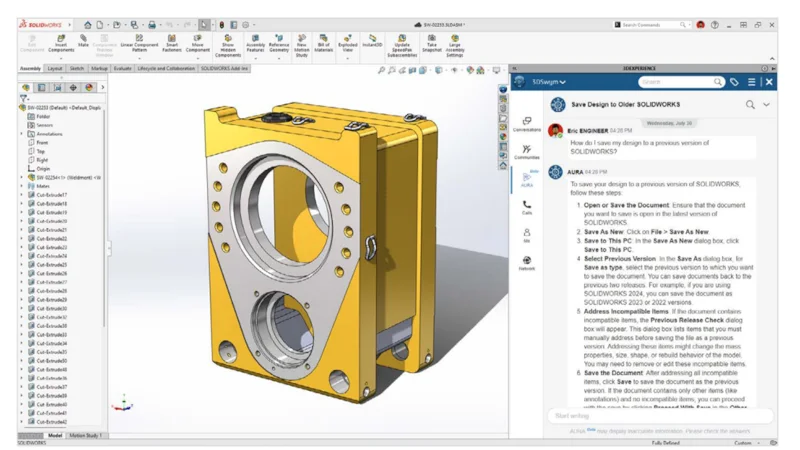
AURA is an AI virtual companion that searches your data stored on the platform to extract the knowledge stored in it. You can use AURA in 3DSwym to quickly summarize community posts, wikis, questions, and ideas, capturing key takeaways and knowledge from your conversations to help you collaborate better.
- Big Improvements to Platform Collaboration
SOLIDWORKS 2026 collaboration improvements focus on simplicity and functionality that helps you meet your daily collaboration needs. Enhancements include:
Collaboration from within SOLIDWORKS
Connect and collaborate with industry peers by accessing the SOLIDWORKS User Forum directly from within SOLIDWORKS. In addition, you can share information using 3DDrive and 3DSwym right from SOLIDWORKS.
Drawing Stamping
This year, we’ve enhanced drawing stamping by adding multi-level approvals for drawing stamping that include maturity status, user names, and email addresses, so you can easily view these important details in 3DPlay.
Support for Cut Lists on the 3DEXPERIENCE platform
Assign a cut list for a sheet metal or weldment part that will include all the metadata and properties of the part, improving downstream communication.
- Customer-driven Enhancements
Customer-driven enhancements are everything – because it’s all about you, our customers. I am particularly proud this year of what we delivered in my favorite area, drawings – not only AI-driven drawing creation but also time-saving detailing capabilities. Here are some of the features we’ve implemented based on customer demand.
Automatic Dimension Line Breaks for Intersecting Text and Annotations
Automatically add precise breaks to dimension lines where they intersect or overlap with text, annotations, or other dimensions—eliminating visual clutter and ensuring drawings remain clear, legible, and professional-looking without manual adjustments.
Configuration Tables in Drawings
Create configuration tables directly in your drawings to display part and assembly variations—such as dimensions or components—or custom properties, so you can clearly document all design variations in one drawing and simplify management of complex, multi-configuration models.
Creating a Flattened BOM
In the Bill of Materials (BOM) PropertyManager, you can flatten a BOM to display the total quantities for all components. A new BOM type called Flattened now enables you to create a BOM listing all the components used, along with the total quantity used throughout the main assembly and its sub-assemblies. This helps streamline the collaboration between design, procurement, and manufacturing.
Simplified Interface
SOLIDWORKS offers a more intuitive interface that displays the most commonly used commands, helping new users focus on design, reduce distractions, and work more efficiently.
To activate the Simplified Interface, you can either open an existing document or start a new one. If you customize the interface while in Simplified Interface mode, SOLIDWORKS will save those customizations for future use of the simplified interface. You can also switch between the Simplified Interface and the default interface.
Out of the hundreds of enhancements we delivered this year, these are some of my favorites. Make sure to check out the new release and discover your favorites.
2) SOLIDWORKS DESIGN IS AN INDUSTRY FAVORITE APPLICATION KNOWN FOR ITS EASE OF USE AND REPUTATION FOR MAKING CAD ACCESSIBLE. HOW DOES SOLIDWORKS 2026 EXPAND ON THIS GOAL, AND WHAT DOES THE FUTURE LOOK LIKE?
We will continue to expand the power of AI to help you automate everyday tasks and gain valuable insights from your data and SOLIDWORKS models. One aspect is to help you do more in less time, for example, by providing new ways of interacting with SOLIDWORKS. I envision a future where AI enables you to chat, speak, and type as ways to learn, use, and interact with SOLIDWORKS. It will be way faster than using commands.
We will continue to improve cross-company collaboration, making platform-based collaboration even easier and simpler.
We will use the latest technology, whether it is hardware or software, to enhance the user experience. For example, the extended reality (XR) environment in xDesign enables you to visualize your product in a virtual or real world with the virtual reality (VR) and augmented reality (AR) settings.
We will never stop improving ease of use and performance; this is in our DNA. With every release, we focus on improving the user experience, making you more productive and effective. Some key performance improvements include the previously mentioned selective loading capability for loading assemblies faster and enabling concurrent engineering. You can save time when working with large assemblies with the ability to shut off auto-resolve and then open an assembly in Lightweight mode. Assemblies will only get bigger and bigger, so performance is a key area we will continue to work on.
We will keep on listening to our customers and delivering customer-driven enhancements. As you know, every year we deliver hundreds of customer-driven enhancements. I encourage you to help us prioritize enhancements by submitting your idea to our annual customer Top Ten list and joining us at 3DEXPERIENCE World 2026 to see what we delivered.
3) WHAT ELSE IS IN THE WORKS AND WHAT SHOULD CUSTOMERS CHECK OUT?
Configure, Price, and Quote
Many SOLIDWORKS users work in the industrial equipment industry. Industrial equipment is rarely standard, and every project comes with specific customer requirements, creating a lot of back-and-forth between departments, which leads to slow quotes and missed opportunities.
We are working on a Configure, Price, and Quote (CPQ) solution that will help you accelerate your sales process by building a rules-based configurator that offers real-time 3D visualization, instant pricing updates, and guided selection logic.
This solution will be integrated with SOLIDWORKS and the 3DEXPERIENCE platform so that everyone is looking at the same data.
Support for Configure-to-Order workflows will be coming soon, which means customers will be able to configure a product based on pre-defined options and rules. Stay tuned for what’s next, and get ready to quote faster, win more business, and deliver orders with confidence.
Cloud-native Design
Our end-to-end cloud-native product development solution, xDesign is quite popular with our customers. With no installs or IT overhead, it runs in your browser and includes professional-grade design tools, built-in collaboration, data management, project tracking, and much more. The fact that so many makers and hobbyists who are not professionally trained in CAD design are using it goes to show how easy it is to use.
Command Predictor
One of the cool tools we’ve heard our customers are hooked on is a feature we introduced last year, the Command Predictor. It uses AI to help predict your next move. A toolbar pops up with the most likely possible options, so you don’t have to spend time sifting through commands. You can enable or disable this command as you see fit. I encourage you to give it a try! You might be pleasantly surprised. The point I’m driving here is to give the new functionality that’s available to you a try.
3DEXPERIENCE World 2026
You don’t want to miss the event where you can get a first look at what’s coming and get your hands on what’s available. 3DEXPERIENCE World 2026 is taking place in Houston, Texas, in February 2026, and I’m excited to announce registration is now live!

4) ARE CUSTOMERS TAKING ADVANTAGE OF THE CLOUD-BASED SERVICES AVAILABLE TO THEM WITH EVERY SOLIDWORKS LICENSE? WHY WOULD YOU ENCOURAGE THEM TO DO SO?
Many already are. We cater to professionals, makers, students, and hobbyists. More than 100,000 makers are taking advantage of the 3DEXPERIENCE platform when using 3DEXPERIENCE SOLIDWORKS or the SOLIDWORKS xDesign browser-based solution.
A growing number of capabilities, such as the AI-powered AURA companion and performance improvements, such as selective loading, will be available only in SOLIDWORKS Design connected to the platform, making the platform irresistible. The platform helps you extract knowledge with a powerful virtual companion, enables you to work more easily with large assemblies, capture every aspect of your design as a virtual twin, and so much more.
It all begins with the ability to easily store, manage, and collaborate on your data. Regardless of the size of your assemblies, all companies have the same goal—everyone wants to capture the full detail of their data— and with a platform approach, you can accomplish that by having a virtual twin with all that rich data captured from concept to manufacturing and the full lifecycle from start to finish.
Another benefit of the platform is that we deliver functional deliveries throughout the year, making enhancements available as they surface, so you don’t have to wait for an annual release. I’m happy to announce that, as of the latest functional delivery in September, we’ve given you more control over when you update SOLIDWORKS. You can now choose whether to update the 3DEXPERIENCE platform components only or update both the platform components and the SOLIDWORKS apps at the same time.
The growing number of amazing capabilities is the reason why customers should put their data on the platform.
And now that the platform is included with every license of SOLIDWORKS, it’s right at your fingertips. The 3DEXPERIENCE Transition Assistant tool enables the migration of data from SOLIDWORKS PDM Professional or a local drive to the 3DEXPERIENCE platform in a secure fashion. If interested, talk with your local reseller.
On a closing note, I want to thank you, our customers. We have been with you for the past 30 years, serving you, supporting your success, and feeling proud of being a part of it. The SOLIDWORKS growth is due to our amazing user community – we would not be here without you. Thank you for helping us improve.
To learn more about what’s new in SOLIDWORKS 2026, visit: https://www.solidworks.com/product/whats-new