
For three decades, SOLIDWORKS has been a pivotal force in the evolution of engineering and design. The software has consistently provided powerful, accessible tools that have enabled designers to create some of the world’s most innovative products. To celebrate this milestone, we’re taking a look back at the top features and enhancements that have defined the SOLIDWORKS experience, as highlighted in our recent eBook, “The Ultimate SOLIDWORKS Top 10 List.”

This journey from a pioneering Windows-native CAD application to a cloud-connected platform reflects a commitment to continuous improvement. We asked long-time SOLIDWORKS users and R&D members which features and enhancements they thought had the most memorable impact on design workflows. Each enhancement represents a significant step forward in making 3D design more intuitive, efficient, and powerful. Let’s explore what the people who create and use SOLIDWORKS products think truly defines SOLIDWORKS Design.
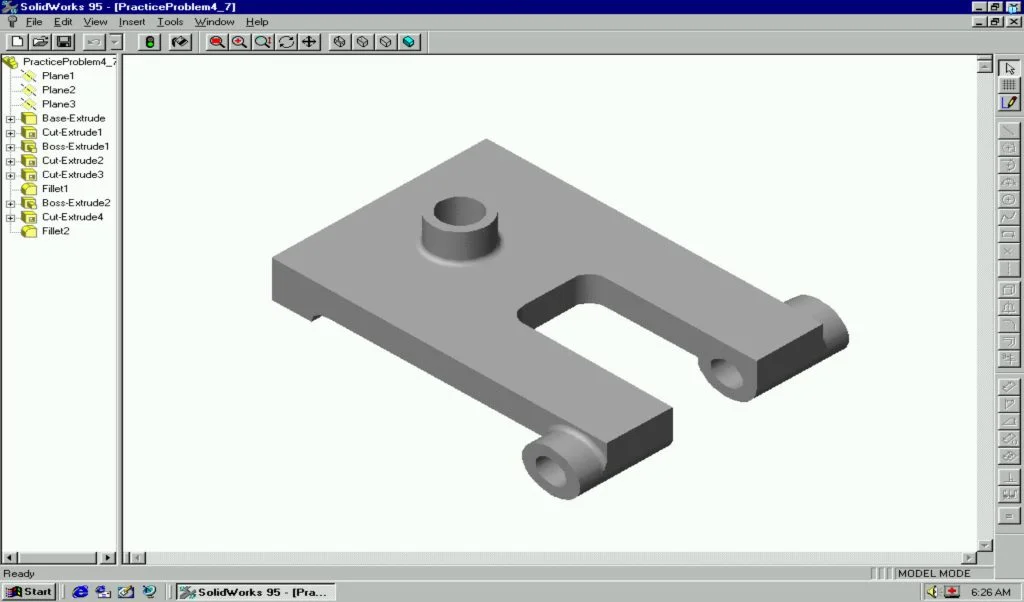
10. SOLIDWORKS 1995
The original release deserves a spot on this list because it democratized 3D CAD. As the first professional-grade tool built natively for the Windows operating system, SOLIDWORKS 1995 made high-end design accessible and affordable. Its familiar user interface drastically shortened the learning curve, empowering a new generation of engineers to move into 3D design and begin creating innovative products almost immediately.
9. Cloud Services
Marking the third major shift in SOLIDWORKS history, the integration of Cloud Services via the 3DEXPERIENCE platform has transformed collaboration and data management. It allows teams to store, access, and share CAD files securely from anywhere. With built-in version control and browser-based access, data is always up-to-date and instantly shareable, providing powerful data management capabilities without complex IT overhead.
8. RealView Graphics
RealView Graphics brings models to life by providing real-time rendering of materials, reflections, and shadows directly in the modeling window. This gives users a fast, intuitive sense of how a finished product will look without needing to run a separate, time-consuming render. The semi-photorealistic visuals are often sufficient for design reviews and presentations, enhancing communication and decision-making.
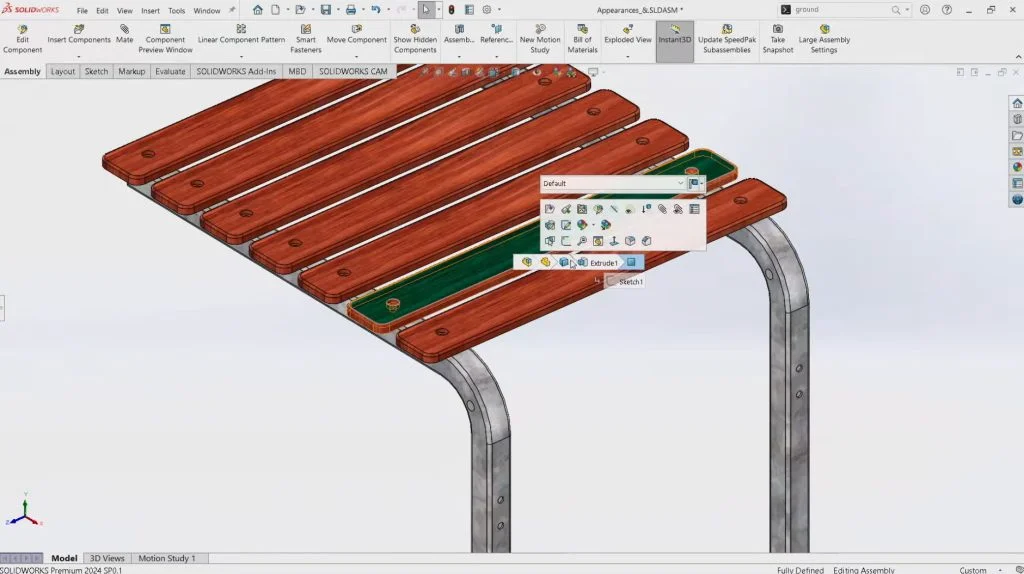
7. Breadcrumbs
Navigating large, complex assemblies can be challenging. Breadcrumbs simplify this process by providing an on-screen navigation path that follows your selection—from an edge or face up through the feature, body, and document. This contextual menu appears right beside the cursor, eliminating the need to hunt through the FeatureManager and saving significant time.
6. Interference Detection
Catching design flaws early is essential to avoiding costly downstream fixes. Interference Detection is a critical tool for this, allowing engineers to identify where parts clash or overlap within an assembly. Whether checking selected components or an entire assembly, this feature helps ensure proper fit and function before a single physical prototype is made.
5. Hole Wizard
The Hole Wizard automates the creation of standard hole types, from counterbores and countersinks to tapped holes. It eliminates the tedious and error-prone process of manually looking up specifications and extruding cuts. By ensuring holes are correctly sized and positioned according to industry standards, the Hole Wizard saves time, reduces errors, and improves design consistency.
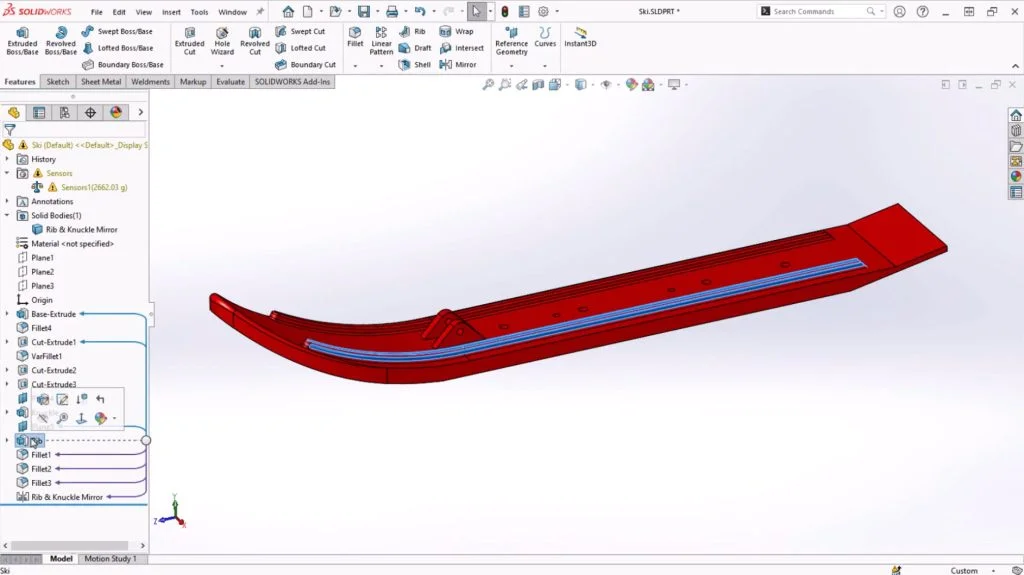
4. FeatureManager Design Tree
Present since the very beginning of SOLIDWORKS, the FeatureManager design tree revolutionized how designers interact with their models. It provides a structured, hierarchical view of every sketch, feature, and mate in a design. This intuitive interface broke away from the cryptic command lines of older UNIX-based systems, offering drag-and-drop control that made 3D modeling feel more visual and accessible.
3. Mouse Gestures
Speed and efficiency are critical in design, and Mouse Gestures deliver on both fronts. This feature provides a fast, customizable way to access common commands with a simple flick of the mouse. By holding the right mouse button and dragging, users can instantly execute commands without moving the cursor to a toolbar. This reduces mouse travel and clicks, keeping the creative process fluid and uninterrupted.
2. Configurations
Configurations are a cornerstone of efficient design, enabling the creation of multiple variations of a part or assembly within a single file. This is ideal for managing product families or iterating on designs without creating dozens of separate files. By allowing users to control dimensions, features, and components for each variation, Configurations simplify data management and accelerate the entire design process.
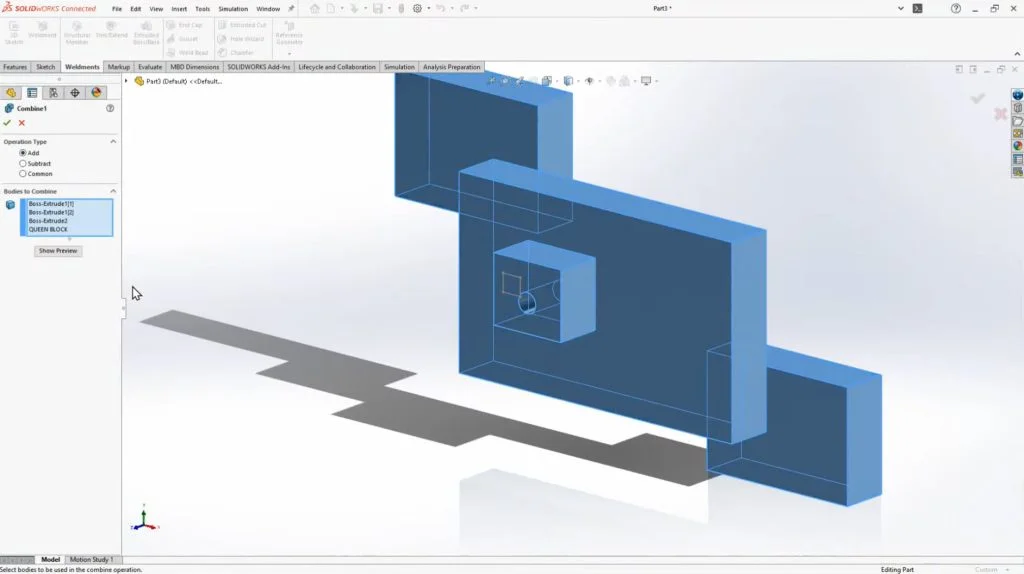
1. Multibody Modeling
A true game-changer, Multibody Modeling allows users to create and manage multiple solid bodies within a single part file. Before this, engineers were limited to one body per part, requiring clumsy workarounds for complex designs. This feature unlocked powerful workflows, especially for weldments and sheet metal, streamlining the design of interconnected components and enabling faster iterations without juggling multiple files.
Honorable Mentions: The Power of Community and Accessibility
Beyond specific software features, the SOLIDWORKS ecosystem has thrived thanks to programs that support its users. Honorable mentions go to:
- SOLIDWORKS User Group Network (SWUGN): A global community for peer-to-peer learning and networking.
- SOLIDWORKS Education Edition: Equipping the next generation of engineers with industry-standard tools.
- Champions Program: Recognizing passionate advocates and community leaders.
- SOLIDWORKS for Makers & Startups: Providing affordable or free access to professional tools for hobbyists and early-stage companies.
- SOLIDWORKS Certification: Offering industry-recognized credentials to validate user expertise.
The Future of Product Innovation
For 30 years, SOLIDWORKS has focused on helping engineers work smarter and faster. The next frontier is the strategic integration of artificial intelligence (AI). AI-powered tools are set to enhance productivity by capturing expert knowledge, flagging issues early, and accelerating design iterations. From predictive analytics that guide business decisions to simulations that suggest material alternatives, the future of design is data-driven and intelligent.
As we look ahead, the commitment remains the same: to provide tools that not only keep pace with change but get ahead of it. We are excited to continue supporting the incredible community of designers and engineers who are building the future.
Read the eBook for all the details about our list and tell us if you agree. Join us for the next 30 years of SOLIDWORKS!