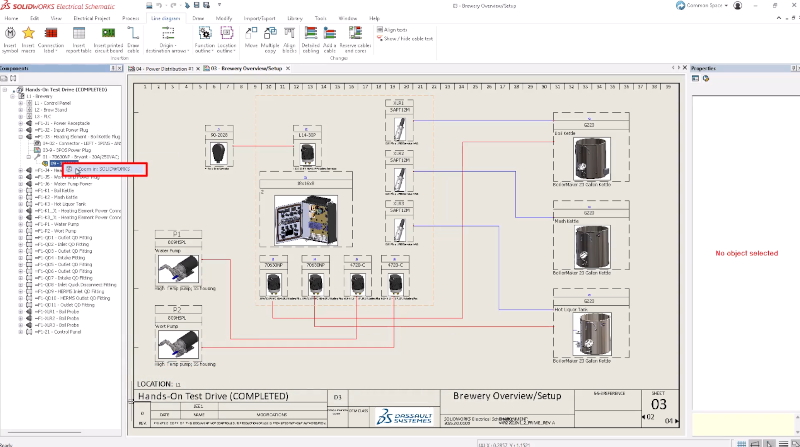

Calling all electrical engineers, electrical designers and CAD administrators. Get ready to accelerate your product designs with new automation and data management enhancements in SOLIDWORKS Electrical Schematic Designer and SOLIDWORKS Electrical 3D, now available in the functional delivery (FD) R2026x FD02.
In addition to its cloud-connected capabilities on the 3DEXPERIENCE platform, SOLIDWORKS Electrical Schematic Designer helps you create intelligent 2D electrical schematics, control panel layouts, and terminal diagrams. SOLIDWORKS Electrical 3D (E3D), also cloud-connected, enables a direct, two-way connection between 3D CAD and SOLIDWORKS Electrical Schematic Designer, enabling you to place electrical components in 3D, auto-route wires and cables using rules, and generate accurate production documentation like wire lengths and harness drawings.
The ability to bring 2D electrical designs into the 3D mechanical CAD space offers a multitude of benefits, including the ability to determine optimal wire, cable, and harness lengths and automatically synchronize design and documentation between both electrical and mechanical projects.
In this blog, I want to discuss the following SOLIDWORKS electrical updates, including the ability to quickly jump directly between your 3D assembly and 2D schematics with one click.
The following enhancements apply to SOLIDWORKS Electrical Schematic Designer.
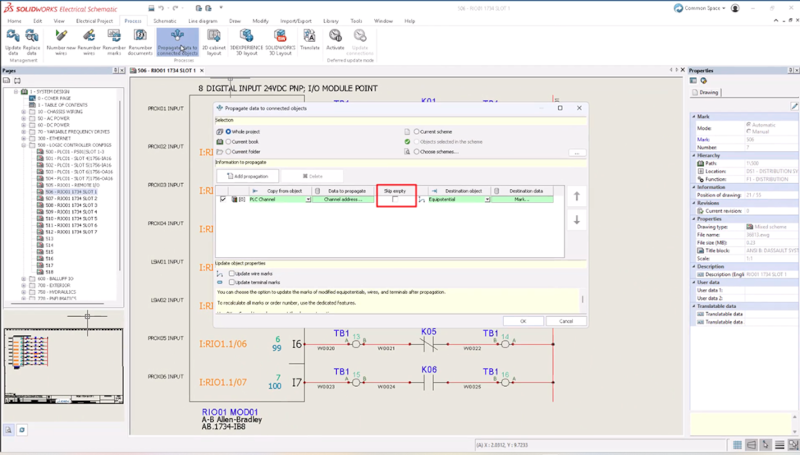
Skip Empty Data Propagation Option
Prevent data loss during automated propagation by enabling the new Skip Empty option in propagation rules. When a source value is blank, such as a wire address that has not been assigned, propagation skips that value and leaves the existing destination data untouched, eliminating manual cleanup and protecting valid data across large, complex projects.
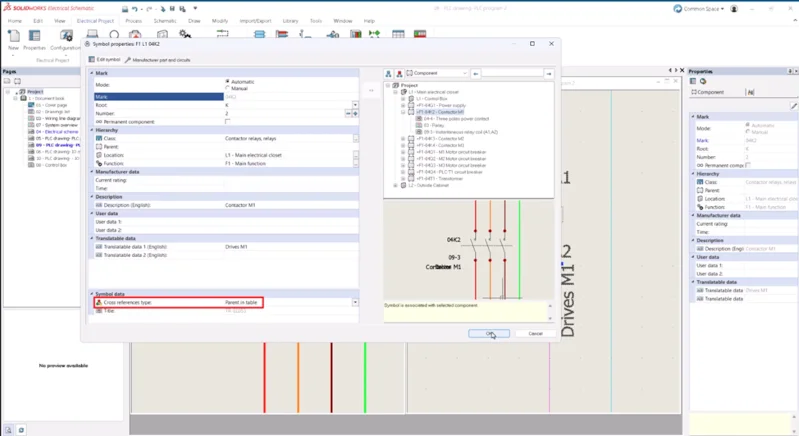
Component Mark Assignment Priority Option
Control which symbol drives the component mark with a new Component Mark Assignment Priority option. Choose between two methods: prioritize by cross-reference relationship, where parent symbols always drive the mark, or by symbol type hierarchy. Whichever method you choose, the designated master symbol drives the component mark consistently across all drawing types, eliminating unexpected overrides and reducing manual corrections in complex multi-drawing projects.
SOLIDWORKS Electrical 3D
Collaboration between electrical and mechanical teams has never been easier. With SOLIDWORKS Electrical 3D, users of SOLIDWORKS Design and SOLIDWORKS Electrical Schematic Designer can work collaboratively to improve communication between teams and keep everyone up to date.
With SOLIDWORKS Electrical 3D, designers and engineers can seamlessly integrate electrical schematics, design data and wiring diagrams from SOLIDWORKS Electrical within the 3D model of a machine or other product. This real-time, bidirectional tool enables improved collaboration between electrical and mechanical designers and allows for the placement or removal of electrical components in the 3D CAD model. The ability to design across both 2D and 3D helps ensure component fit, optimize wire lengths and routing paths, and eliminate the need for excessive, costly physical prototyping.
The following enhancements apply to SOLIDWORKS Electrical 3D with a single-user license and a device term license.
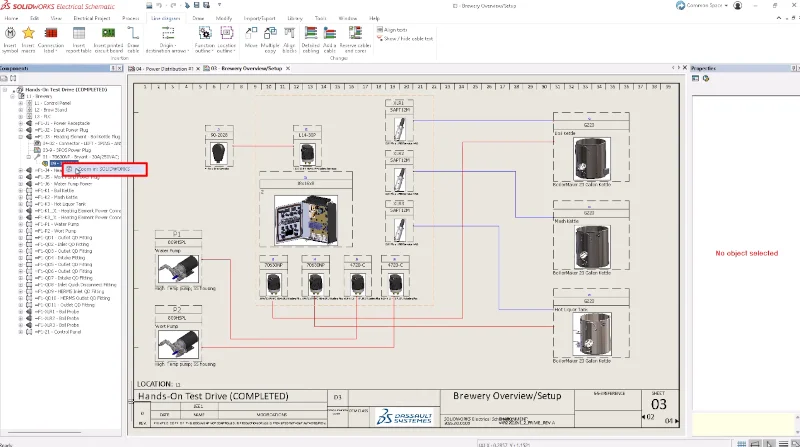
Cross-Navigation Between SOLIDWORKS Electrical Schematic Designer and SOLIDWORKS Electrical 3D
Jump directly between your 3D assembly and 2D schematics with one click. Simply select any component in your 3D model, click Go-To, and the correct schematic sheet opens with the symbol in view. Navigation works in both directions, from 3D to schematic and back, eliminating manual searches across large assemblies and multi-sheet drawings.
To see the corresponding videos, visit the What’s New Wiki page here. With each update, we aim to deliver cloud-enabled enhancements, new features, and performance improvements throughout the year, rather than waiting for annual releases. These updates add critical productivity tools, including AI-driven design, improved 3D modeling capabilities, and enhanced data management workflows, keeping design teams competitive and accelerating product development time.
See my last blog on FD01 here to ensure you are using the latest features and improve your design workflow today!
For those that aren’t on the cloud yet and are struggling with data loss, complex multi-drawing projects, manual searches across large assemblies, strict compliance standards and software performance issues, it’s time to get your data and your teams connected on the cloud.
SOLIDWORKS Electrical solutions integrate with the 3DEXPERIENCE platform, offering web-based libraries, built-in lifecycle management, and collaboration capabilities, enabling teams to work on the same project simultaneously. Learn more about integrating your electrical and mechanical designs into SOLIDWORKS in this webinar.
Whether you are new to SOLIDWORKS solutions or a pro, Dassault Systèmes offers a number of training solutions to get you up to speed and keep your skills sharp. Check out the SOLIDWORKS online learning portal for training resources.
Visit the SOLIDWORKS Electrical Schematic Designer web page to get a first look, see customer stories, and more here. To learn more about SOLIDWORKS Electrical 3D, visit the webpage here.