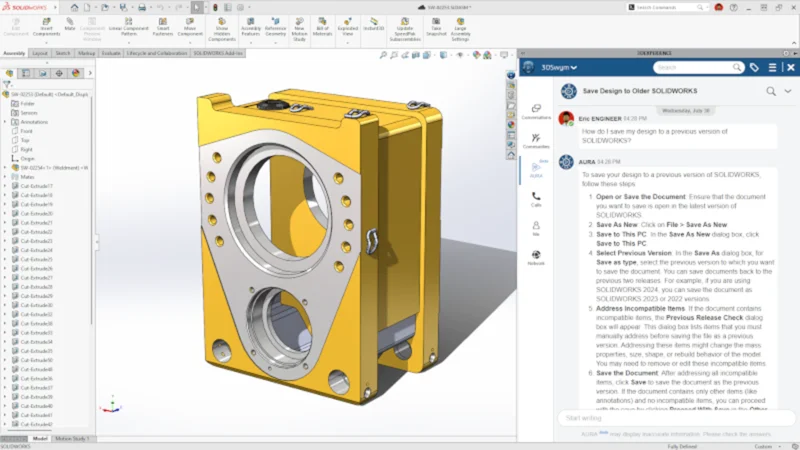

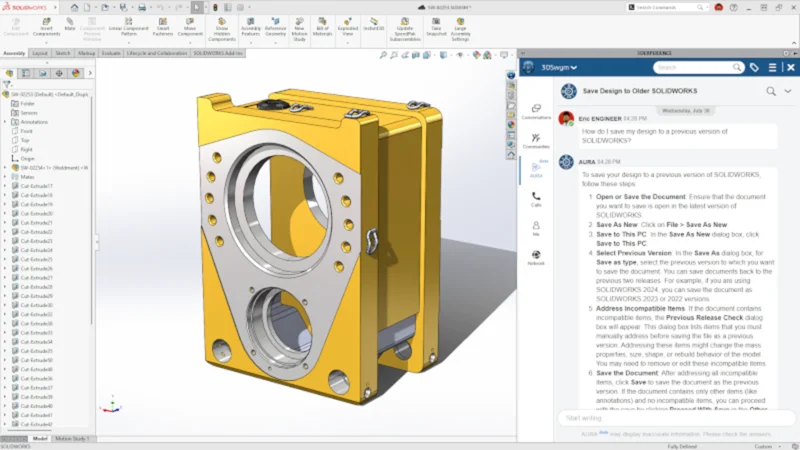
How do I save my design to a previous version of SOLIDWORKS? Ask AURA, a new artificial intelligence (AI) virtual companion in 3DSwym and SOLIDWORKS on the 3DEXPERIENCE platform.
In SOLIDWORKS 2026 GA (general availability), we introduced AURA to help customers find and utilize internal and external content on 3DSwym and the 3DEXPERIENCE platform.
AURA can be used to quickly search documentation and content and can summarize posts, questions, and wikis to capture key takeaways at a glance. For example, when you ask AURA how to save your design to a previous version of SOLIDWORKS, it will quickly generate the answer with steps and point you to the right resources.
You can access AURA from anywhere in 3DSwym and directly from SOLIDWORKS inside the MySession task pane.
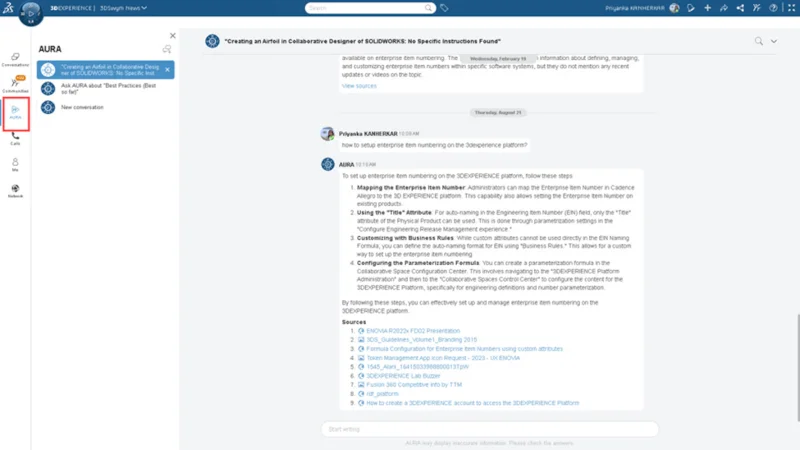
Additionally, AURA can offer helpful tips on using SOLIDWORKS, based on official developer documentation of 3DS solutions from Dassault Systèmes and user-generated content. For example, you could ask AURA how to set up an enterprise item number on the 3DEXPERIENCE platform. AURA will search all communities, documentation, and resources from 3DSwym, retrieve the most relevant results, and provide a direct link to the source.
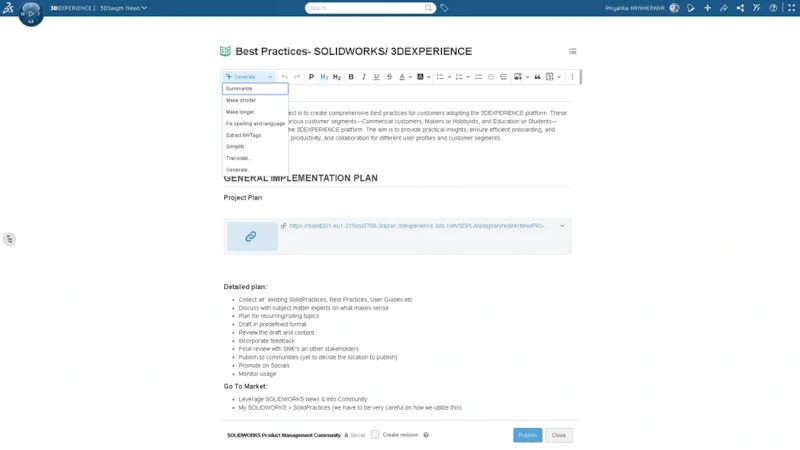
AURA can instantly edit, summarize, simplify, and translate any 3DSwym content you create, in addition to public-facing content. Internal content will only be available to you and members of your company, protecting intellectual property.
Key Capabilities:
AURA teaches you and assists you, keeping you focused and on track, and is designed to:
DISCOVER FOR YOU
- Retrieve only trusted, context-aware answers with source links.
- Tailor responses by community or project with contextual collaboration.
- AURA can access resources like the SOLIDWORKS User Forum, SOLIDWORKS News & Info, and other communities to leverage learning resources, best practices, and more for you.
TEACH YOU
- Instantly summarize, expand, simplify, or correct content across all 3DSwym formats.
- Learn and share more effectively with clear, enhanced information.
- Break language barriers with built-in translation inside the platform.
- Preserve meaning while improving clarity and accessibility.
WORK FOR YOU
- Eliminate repetitive tasks, like rewriting, condensing, or translating content.
- Save time by letting AURA handle busy work while you focus on design and innovation.
- Boost productivity with instant, high-quality content output.
How to Ask for the Best Result
Be specific. Name the product, release, and environment. State the format you want. Ask for links when you need traceability.
Use this structure for high-quality answers:
Role + Product + Version + Task + Context + Constraint + Deliverable
Examples
- “Role: mechanical designer. Product: SOLIDWORKS. Version: 2025. Task: detail a drawing with a revision table that updates from PDM. Context: ANSI. Constraint: only standard PDM add-in. Deliverable: numbered steps plus links.
- Avoid vague prompts like “My drawing is slow.” Instead, search “SOLIDWORKS 2025 drawing is slow when updating balloons. Another example would be to search “Large Design Review is off. Provide likely settings to check and link supporting posts.”
When to Use AURA
- You need documented procedures, settings locations, or conceptual explanations that likely exist in 3DSwym or official documentation.
- You want to summarize long posts into a short checklist.
- You need to rewrite or translate the text before publishing to your team.
Search Parameters
AURA is similar to other intelligent AI assistants like ChatGPT and Gemini but is built for SOLIDWORKS users. Some things to keep in mind are:
- AURA focuses on text content in 3DSwym posts, wikis, ideas, and official documentation. Documents and other formats are partially supported.
- External web browsing is not available today.
- AURA retains context within the same conversation, not across tenants or sessions for training.
And this is just the first iteration. Stay tuned for more on AURA as we will be making additional enhancements in the future to help you work smarter and faster.
Watch this video for a quick demo.
For more examples, see the What’s New Wiki page and log in with your 3DEXPERIENCE ID.
To see what else is new in SOLIDWORKS 2026, check out my last blog post and visit the What’s New webpage.
For more examples, see the What’s New Wiki page and log in with your 3DEXPERIENCE ID.
To see what else is new in SOLIDWORKS 2026, check out my last blog post, and visit the What’s New webpage.
Also, don’t miss 3DEXPERIENCE World taking place February 1-4th in Houston, Texas. Catch me in the following presentations:
A Day with a SOLIDWORKS Designer: One Platform, Limitless Collaboration
Tuesday, Feb. 3 from 11:00 AM – 12:30 PM CST
A New Approach to Design and Manage Large Assemblies Without Fear
Tuesday, Feb. 3 from 4:00 PM – 4:45 PM CST
Mega Meetup: Women Transforming STEM – The Sky is NOT the Limit
Tuesday, Feb. 3 from 5:00 PM – 5:45 PM CST
Expand Your Horizons: What’s New and What’s Next for SOLIDWORKS Design
Wednesday, Feb 4 from 9:30 AM – 10:15 AM CST
Happy New Year, everyone!