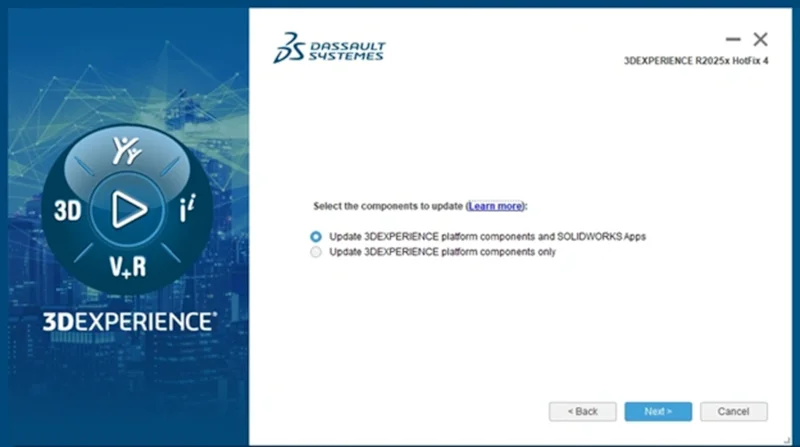

Good news! You now have more flexibility when it comes time to update to the latest functional delivery (FD) of SOLIDWORKS. Beginning with R2025x functional delivery FD04, September 13th, you can decide whether to update to the latest version or continue working with the current one.
Throughout the year, we make the latest enhancements available to you via functional deliveries releases, so you don’t have to wait for the annual major release to take advantage of the latest in new functionality. However, we understand that customers may not be ready to update at the time of the latest update, so we are making that option more flexible.
Previously, you would have 14 days until the software would automatically install. Now with each minor FD release, you will be able to choose whether or not to update your SOLIDWORKS apps.
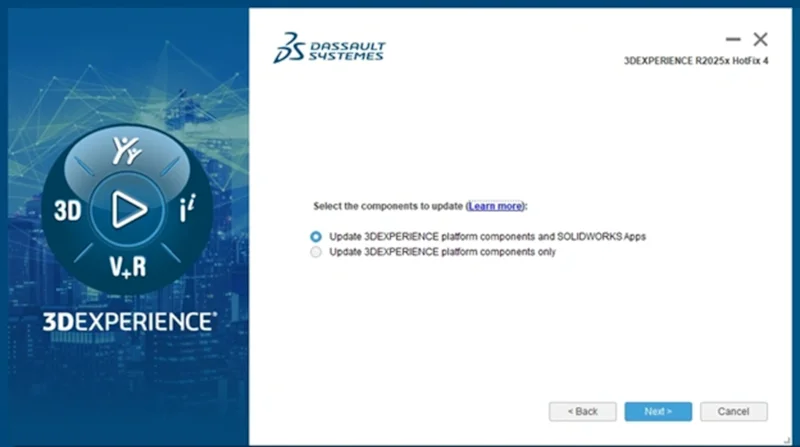
You have two update paths:
Option 1: Update 3DEXPERIENCE Platform Components Only – excludes SOLIDWORKS apps.
This option is ideal for those who wish to continue working with their current SOLIDWORKS applications.
Option 2: Update Both 3DEXPERIENCE Platform Components and SOLIDWORKS Apps.
This option is recommended for those who want to start using the latest enhancements for both SOLIDWORKS apps and the 3DEXPERIENCE platform components.
I highly recommend you update as soon as possible, as each set of enhancements is designed to improve your productivity. However, we understand that sometimes you want to continue working without interrupting active projects, and now you definitely have that option.
We realize that not everyone is working on the latest version, and it’s not always practical to upgrade at a specific time. That’s why we are working to give you more upgrade options, so you can schedule planning to better align with operational schedules and continue designing and collaborating with fewer interruptions.
Be sure to take advantage of the updates as soon as they are released to ensure you have access to the latest game-changing functionality, including artificial intelligence (AI)-powered features, such as automatic hole recognition, generative drawing creation, selective loading multi-level approval, drawing stamping, cut list support, and so much more!
Stay tuned to the SOLIDWORKS blog and visit the What’s New page to learn more about the latest updates.
Did you know that 3DEXPERIENCE SOLIDWORKS is now available through our online store? Discover what it can do for you.