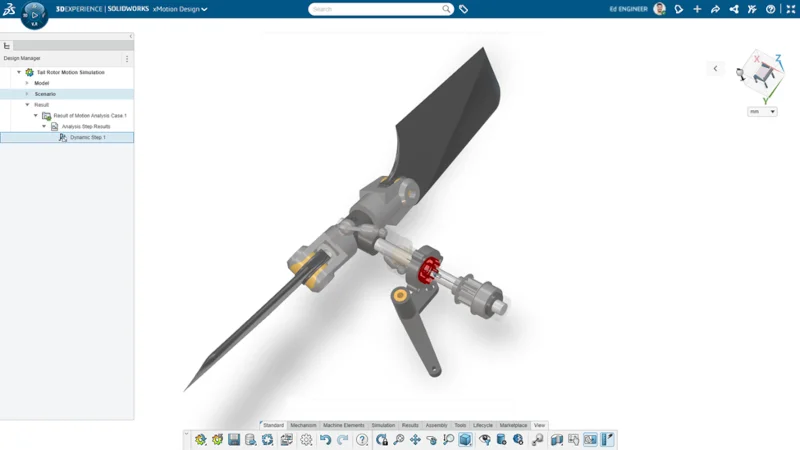

It’s been a whirlwind year since joining Dassault Systèmes last April. I attended my first 3DEXPERIENCE World user event this year, where I led a hands-on session on motion simulations using our cloud-based motion analysis solution, 3D Motion Creator, and demonstrated how simulating motion early lets you validate mechanisms, optimize performance, and spot potential issues before building prototypes.
You don’t have to be a simulation expert to do analysis. 3D Motion Creator is easy to use and offers kinematic and dynamic motion capabilities to help you evaluate and validate your designs. Set up your motion analysis efficiently using intuitive tools and modeling elements. Built on the cloud-based 3DEXPERIENCE platform, 3D Motion Creator enables automated motion model generation from 3D design and quick updates to the model after any design changes.
You can explore multiple design scenarios, make informed trade-offs, and accelerate innovation, all while reducing development time and cost. With cloud access, real-time collaboration, and seamless integration into design, simulation, and PLM workflows, 3D Motion Creator enables faster, more efficient design cycles and smarter decision-making.
The latest functional delivery of 3D Motion Creator, R2026x FD01, is here, and I have a few new enhancements to share with you, including an interference probe for clash/clearance visualization and user-defined, x-axis channels in a 2D plot.
Interference Probe for Clash/Clearance Visualization
The updated Interference Probe enables you to investigate clash and clearance situations in your model. Any clashes or clearance issues detected will be indicated in the 3D graphics area, and the affected bodies will be highlighted in red. With the Interference Probe, you can visualize clash volume, minimal distance (for clearance situations), similar to the minimal distance probe, and clearance violation locations. This will reduce the turnaround time for clash and clearance violation analysis, enabling the review of clash volume and clearance information in the 3D view.

User-Defined X-Axis Channels in 2D Plot
Improve your understanding of the mechanical system behavior of your model by generating 2D plots over desired X- channels/axes. Pick and replace the default simulation time parameter with a suitable result output as the X-channel of the 2D Plot. This parameter will be stored for any new curves, and all curves added to the plot later will use this output as the X-channel. Replace the stored X-channel by another X-channel or restore the default by resetting the stored X-channel back to the simulation time.

Check out the What’s New page here to see these enhancements in action.
We’ve also recently introduced some new simulation roles, including SOLIDWORKS Simulation Designer Role, SOLIDWORKS Simulation Engineer Role, and the SOLIDWORKS Simulation Analyst Role.
You can log into 3DSwym to see a demo here, and stay tuned for more on these roles coming soon, and see my last blog on 3D Motion Creator here. For more information about 3D Motion Creator, visit: https://www.solidworks.com/media/first-look-3d-motion-creator.
You’ll find that 3D Motion Creator provides a highly interactive, fully immersive, and tightly integrated design environment for a truly lifelike experience. With 3D Motion Creator, you can:
- Quickly define, simulate, and validate multiple mechanical designs at an early stage.
- Rapidly evaluate what-if design scenarios.
- Significantly increase efficiency in decision-making.
- Share designs, animations, and plots for design collaboration.
Try it today and see how you can elevate your design process by producing exceptional products defined by precise motion, optimized performance, and predictable mechanical behavior.