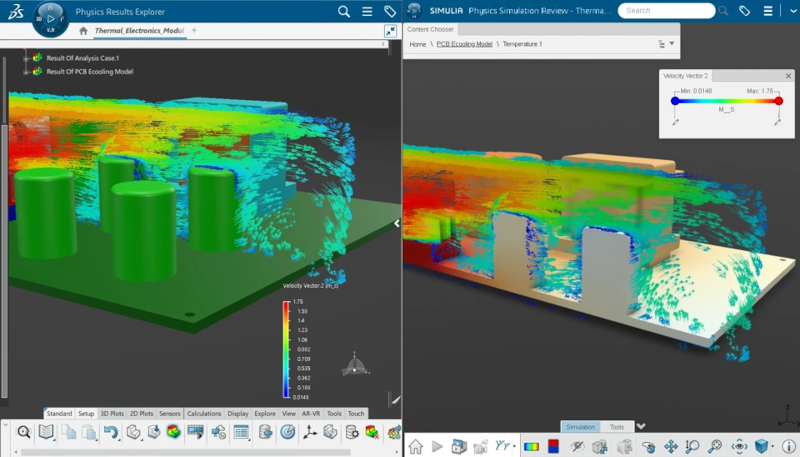

Whether you’re a designer looking for early-stage design insight, an analyst looking for a quick upfront design validation, or an engineer performing advanced structural and durability analysis under complex loading conditions, the SOLIDWORKS simulation portfolio provides simulation capabilities that scale with the complexity of your engineering needs.
Earlier this year, we introduced four new simulation roles in the SOLIDWORKS portfolio, including three structural finite element analysis (FEA) simulation roles: SOLIDWORKS Simulation Designer, SOLIDWORKS Simulation Engineer, and SOLIDWORKS Simulation Analyst, and more recently, the computational fluid dynamics (CFD) role called SOLIDWORKS Simulation CFD Engineer. Together, these roles extend simulation from early structural validation through advanced structural, durability, and fluid-flow analysis.
New capabilities for these simulation roles were added in the July functional delivery update R2026x FD03, including improvements to simulation setup, frequency analysis, loading, fatigue analysis, and results visualization.
The following enhancements apply to SOLIDWORKS Simulation Designer, SOLIDWORKS Simulation Engineer, and SOLIDWORKS Simulation Analyst roles for R2026X FD03.
Enhanced Frequency Analysis of Complex Structures
Investigate frequency responses of complex structures using two new solver options: Advanced Lanczos and Subspace Iteration.
Both are established approaches for extracting eigenvalues used in structural simulations. Lanczos is well-suited to larger models and to efficiently extracting more modes, while Subspace Iteration can be effective for extracting lower modes. The appropriate solver depends on the model’s characteristics and the number of modes required.
These additional solver choices provide greater flexibility when performing frequency analysis on complex structures.
See these enhancements in action in the video here.
Improved Setup Troubleshooting
Unconstrained Mode Detection is now enabled by default in User Preferences, making it easier to identify and address analysis setup issues.
Unconstrained modes can indicate insufficient or missing constraints, or conditions in which components are not adequately connected to transfer load. In structural analysis, these conditions can allow rigid-body motion and may lead to convergence problems or to a model that does not represent the intended physical system.
![[Improved troubleshooting image]](https://blog-assets.solidworks.com/uploads/2026/08/improvedtroubleshootingaug2026.png.webp)
Improved Linear Load Case Definition
Define and manage linear load cases with an improved interface that offers greater flexibility in creating load sets and combinations, reducing the manual steps required to set up complex loading scenarios.
![[Linear load image]](https://blog-assets.solidworks.com/uploads/2026/08/linearloadaug2026.png.webp)
Live Results Access During Solve for Additional Modes
Monitor simulation results interactively as the solve progresses. Catch issues earlier and make informed decisions without waiting for the full solve to complete.
![[live results image]](https://blog-assets.solidworks.com/uploads/2026/08/liveresultsaug2026.png.webp)
Results Annotations
Add annotations to local minimum and maximum result values within a user-defined area, making it easier to identify and communicate important results in a specific region of interest.
![[Results annotation image]](https://blog-assets.solidworks.com/uploads/2026/08/resultsannotationaug2026.png.webp)
Multiple Simultaneous Legends in Results Viewer
Display multiple result legends at the same time in the Post-processing and Simulation Review app when working with scenes, slices, streamlines, or isosurfaces that require their own result legends. This makes it easier to compare multiple result visualizations without repeatedly switching between single-legend views. This also applies to SOLIDWORKS Simulation CFD Engineer.
![[Multiple legends image]](https://blog-assets.solidworks.com/uploads/2026/08/multiplelegendsaug2026.png.webp)
The following enhancements apply to SOLIDWORKS Simulation Analyst.
Improved Performance for Explicit Dynamic Simulations with large Structural Models
Leverage local GPU computing to accelerate explicit dynamic simulations, providing an additional computing option for computationally intensive analyses for larger and more complex structural models.
Explicit dynamics is particularly suited to short-duration, highly nonlinear events such as impact, drop, crash, and other problems involving complex contact or rapidly changing deformation. Explicit methods advance the solution using small time increments, making them well suited to events where conventional implicit solution techniques can become challenging.
![[improved scalability image]](https://blog-assets.solidworks.com/uploads/2026/08/improvedscalabilityaug2026.png.webp)
Stress Gradient Effects for High-Cycle Fatigue
Improve high-cycle fatigue analysis by accounting for stress-gradient effects at the surface.
Stress concentrations occur around geometric discontinuities such as holes, grooves, fillets, and other changes in geometry. However, the fatigue effect of a stress concentration is not necessarily equivalent to applying the full elastic stress concentration to the fatigue calculation. The stress distribution and its gradient near the surface can influence the fatigue response.
FD03 adds the ability to apply a notch factor and provides additional gradient-correction methods alongside the existing approach. These capabilities provide additional options for accounting for stress-gradient effects in high-cycle fatigue analysis and can help reduce conservatism where appropriate.
![[stress gradient image]](https://blog-assets.solidworks.com/uploads/2026/08/stressgradientaug2026.png.webp)
Results Management
Name and comment on analysis results to keep your work organized and easier to review.
![[Results management image]](https://blog-assets.solidworks.com/uploads/2026/08/resultsmanagmentaug2026.png.webp)
What’s New in SOLIDWORKS Simulation CFD Engineer
R2026x FD03 also introduces enhancements to SOLIDWORKS Simulation CFD Engineer, helping you streamline post-processing and gain clearer insight from your fluid and thermal simulation results.
Initialize New CFD Analyses from Prior Results
Accelerate related CFD analyses by reusing converged results from a completed fluid analysis case as the starting point for a new case. This capability supports multiphase and multispecies scenarios and can help new cases reach convergence faster, reducing turnaround time when evaluating design variations, exploring operating conditions, or running parameter studies.
![[initialize image]](https://blog-assets.solidworks.com/uploads/2026/08/initializesimblogaug2726-1.png.webp)
Improved History Measurement Usability
Define, review, and manage history measurements with improved controls in your fluid simulation, making it easier to track selected quantities as the simulation progresses and evaluate how they change over time.
Simplified Scenario Setup Experience
Set up fluid simulation scenarios faster with a redesigned interface that requires fewer steps and guides you through a clearer, more focused workflow.
Watch the videos for improved history measurement visibility and simplified scenario setup here.
These enhancements build on the capabilities introduced with the four new simulation roles. From early structural validation with SOLIDWORKS Simulation Designer to advanced structural and durability analysis with SOLIDWORKS Simulation Analyst, and fluid and thermal analysis with SOLIDWORKS Simulation CFD Engineer, the portfolio is designed to give engineering teams access to simulation capabilities that match their analysis requirements.
By bringing these capabilities into the SOLIDWORKS portfolio, users can progressively move from design-oriented simulation to more advanced structural, durability, dynamic, and CFD workflows as their engineering requirements become more complex.
See my last blog to stay up to date on what else we’ve done this year.
Ready to learn more? Take the guesswork out of design with the latest SOLIDWORKS simulation offerings, and ensure you can make confident design decisions, reduce costly prototypes, and accelerate time to market by checking out our solutions at https://www.solidworks.com/domain/simulation.